
Who has access to what: the access review a supervisor asks for
Regulated companies must show who can open which data, prove it is reviewed, and export the evidence. What the tenant reports give you, and what they do not.
Sooner or later a supervisor, an auditor or a data protection officer asks the same question in one of its forms: who has access to what, how do you know, and when did you last check. For a bank it arrives as the recertification of access rights that MaRisk has required for years and that DORA now spells out for every ICT system. For an insurer it comes through the same DORA rules and the supervisor’s own IT guidance. For anyone processing personal data it is the Article 30 record and the Article 32 duty to be able to demonstrate controls. ISO 27001 puts it in control A.5.18, review access rights at regular intervals, and BSI C5 has a criterion with the same content. The wording differs; the evidence requested is the same list.
This article is about producing that list from a Sapherbox tenant. It covers what the reports show, what the exports contain, how the review can be shown to have happened, and the two limits that an honest answer to a supervisor has to state.
The question has three parts
An access review is not one report. It is three questions, each with its own view.
- By resource: for each folder and file, who can open it and at what level. This is the inventory.
- By person: for each account, internal or external, what it can reach. This is the leaver check and the least-privilege check.
- By exception: which accounts exist without a reason. Dormant guests, failed sign-ins, lockouts.
Sapherbox answers all three on the administrator’s Reports page, in four tabs, each with a CSV export. Every user also has their own, narrower version of the first two for the content they own, which is the subject of whoever shares is responsible. The administrator’s reports are the organisation-wide ones, and they are what a supervisor is asking about.
The access inventory
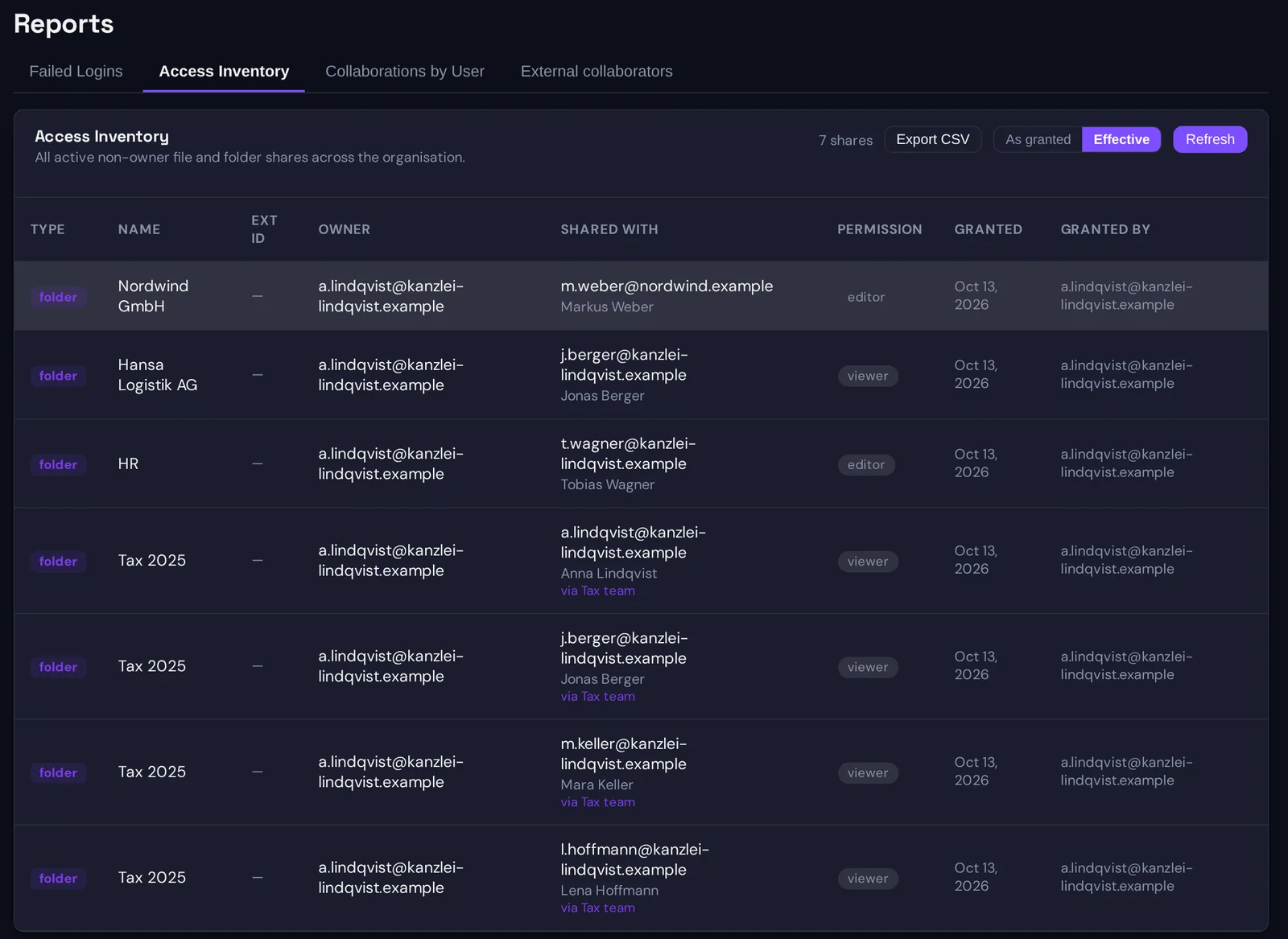
The access inventory lists every active share in the tenant where the grantee is not the owner: one row per folder or file per grantee, with the resource type and name, the owner, who holds the access, the permission level, when it was granted and by whom. It is the complete answer to “who can open what”, built from the grants the server enforces rather than from a spreadsheet someone maintains.
It has two modes, and the difference matters for a review.
Granted lists grantees as they were granted. If a folder was shared with the group “Tax team”, the row says Tax team. This is the view for checking that sharing follows the policy, because it shows the decisions people made: this folder went to that group, at that level.
Effective expands every group grant into the people it currently reaches, and marks each expanded row with the group it came through. If Tax team has eleven members, the folder now has eleven rows, each saying “via Tax team”. This is the view a supervisor means by access rights, because it shows who can actually open the folder today, including people who were added to the group last week and never appear in a sharing decision of their own. Share with the group, not the person explains why group sharing is the better default; the effective view is what keeps it reviewable.
The CSV carries both: a grantee kind column that says user or group, and a via-group column that is filled on expanded rows. A reviewer can filter either way in a spreadsheet.
Collaborations by user
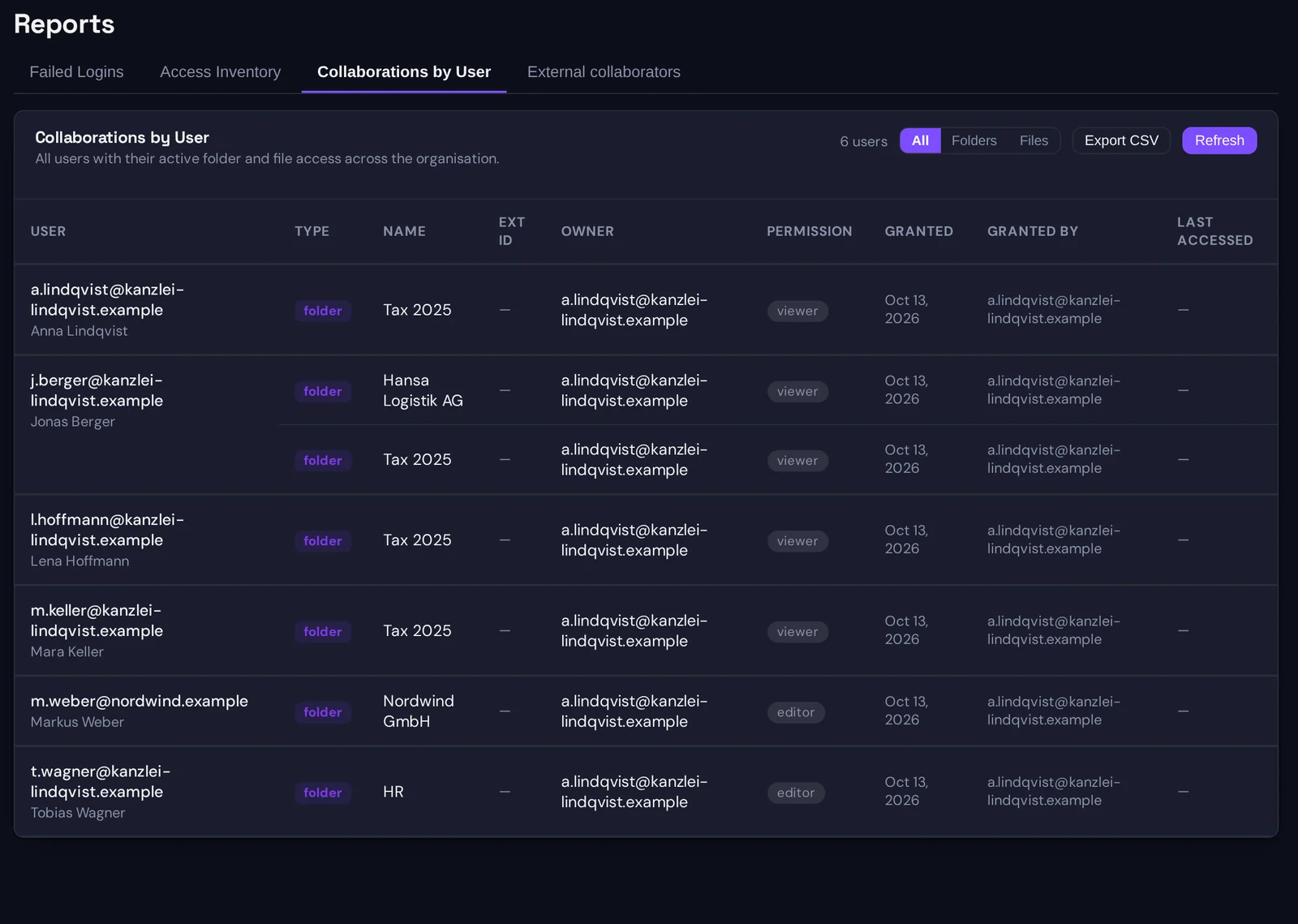
The same data, grouped the other way: one block per account, listing every folder and file it can reach, with the owner, the permission, the grant date, who granted it, and the last time the account accessed it. A filter narrows it to folders or files only.
This is the view for the two checks a supervisor asks for by name. The leaver check: before an account is deactivated, what does it hold, and after deactivation, that the list is empty. The least-privilege check: does an account with editor rights on forty folders need them, and the last-accessed column is the fastest way to see which of those forty it has not opened in a year.
It is also the view for the question that arrives after an incident: this account was compromised on Tuesday, what could it reach. The answer is one block of this report, and the access report is referenced for that purpose in NIS2 and DORA: the audit log they expect.
Dormant guests and the security report
Two reports cover the exceptions.
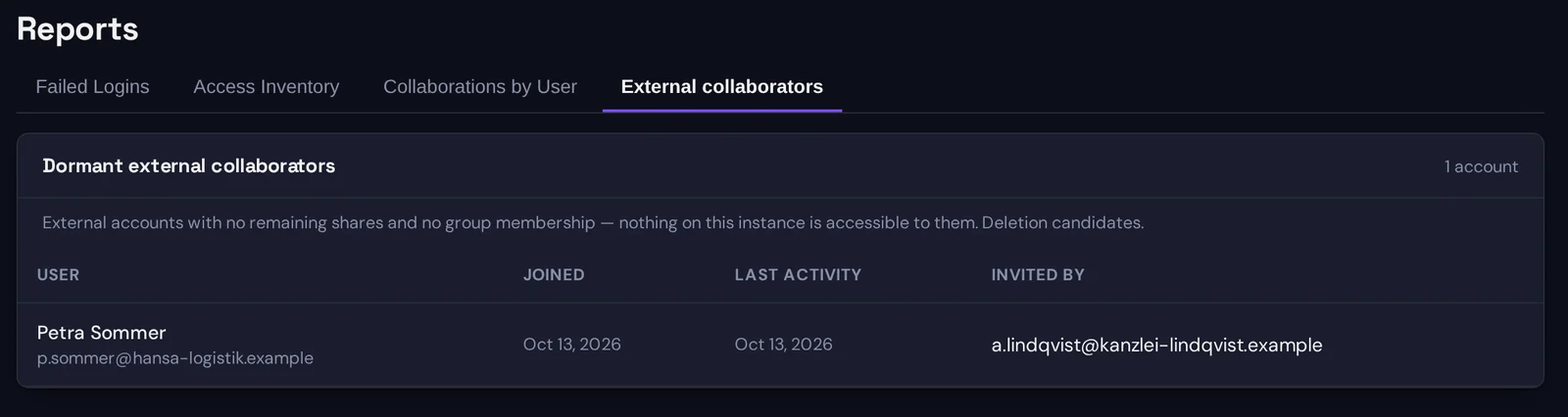
Dormant guests lists external collaborators with no remaining share and no group membership: accounts that were invited for an engagement that has ended, with the date they were created, their last activity and who invited them. These are deletion candidates, and a review that closes them is the kind of housekeeping an auditor likes to see in the log, because each deletion is an audit entry with a date and an administrator’s name.
Security report aggregates failed sign-ins, lockouts and blocked attempts over a period you choose, up to a year, per account and source address, with first and last occurrence and a count. It is not an access review, but the same reviewer usually wants it in the same folder: evidence that authentication failures are watched, and a list of accounts under attack.
Proving the review happened
A report that was generated and read leaves no trace by itself. What leaves a trace is what the review does.
Every grant, every removal, every change of permission level, every group membership change and every key rotation that follows a removal is an entry in the audit log, with the actor, the time and the resource. The log is HMAC-chained so that entries cannot be altered or removed by the application, which is what makes it usable as evidence; an audit trail that cannot be quietly edited describes the design. A quarterly review therefore has a natural evidence pack: the CSV exports dated the day of the review, and the audit entries for the removals and downgrades that the review produced, which the audit page filters by action and date and also exports to CSV.
If the review found nothing to change, say so in the review record and attach the exports. The absence of removals is not evidence that nobody looked; the dated export is.
Two limits to state
A supervisor is better served by a known limit than by a surprise, so here are the two.
Names are masked unless you choose otherwise. Folder and file names are encrypted on the device that created them, so the server, and therefore the reports, see them only in masked form, first and last character with the middle starred, unless the tenant administrator has switched on the setting that stores plaintext names for reporting. The reports are complete either way; what changes is whether a reviewer who does not own the folder can read which folder a row refers to. For an access review that a data protection officer or an external auditor reads, most organisations switch the setting on, and why we encrypt names too sets out what that trades away, so that the decision is a documented one.
The administrator sees access, not content. An administrator can see that a folder is shared with a firm, at which level, since when. They cannot open the folder, because they do not hold its keys. So the review of whether a share is still appropriate, as opposed to whether it exists, has to involve the person who shared it. The organisation-wide report tells the administrator whom to ask. That is the division of labour the sharing responsibility model describes, and it is worth writing into the review procedure rather than discovering during the first one.
A review procedure that fits the reports
For an organisation that has to show a periodic access review, this is the sequence that uses the tenant as it is.
- Export the access inventory in effective mode, collaborations by user and dormant guests on the review date. File them with the date in the name.
- Delete the dormant guests, or document why each stays.
- For every external account in collaborations by user, send the sharer the block that concerns them and ask whether the engagement is live. They remove what is not, from their own Collaborators page.
- For internal accounts, check the ones with the widest reach against their role, and ask the owners to downgrade or remove.
- Export the audit log for the review period, filtered to sharing, group and account actions, and file it with the exports.
- Record the date, the reviewers and the outcome.
Steps three and four are where the knowledge is, and the reports exist so that the people who have it get a short, specific question rather than a long general one.
Questions?
If your supervisor or auditor has a specific format in mind for the access review, or you want the report columns mapped to a particular control set, write to hello@sapherbox.com.