
Why we encrypt file and folder names, not just contents
A file name is often the most sensitive thing about a file. Most encrypted drives leave names in the clear. Sapherbox does not, and the folder-key design is what makes that cheap enough to do.
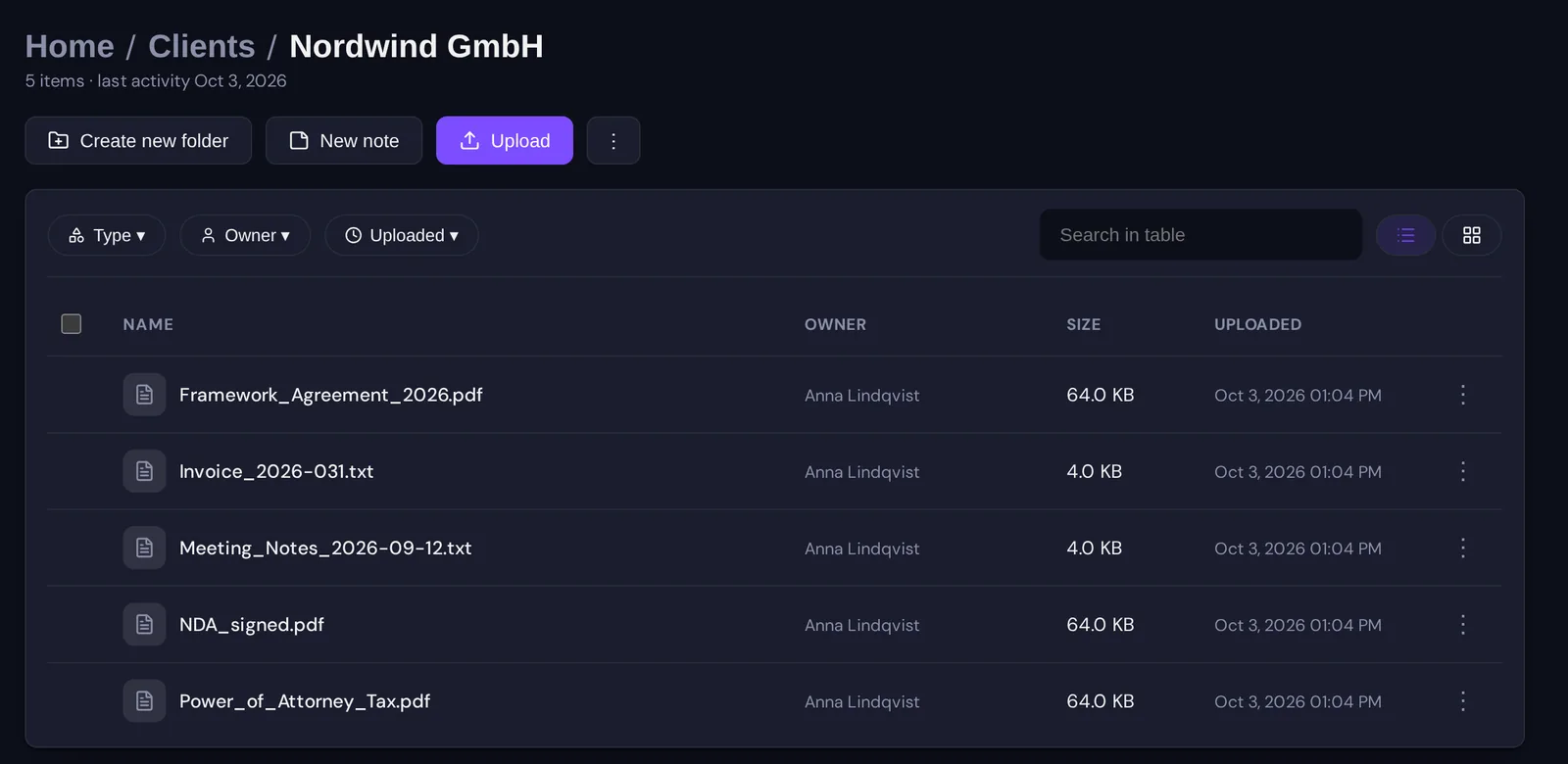
Imagine a vault where every document is perfectly encrypted and the folder tree reads: Clients, Nordwind GmbH, Merger 2026, Due diligence, Board approval draft v3. You have not read a single file and you already know who is being acquired, when, and that it is not final. Add Termination_Letter_Weber.pdf in a personnel folder and a few dated invoice names, and the encrypted contents are almost beside the point.
Names are metadata, and metadata is where most “end-to-end encrypted” storage products stop. Contents are encrypted on the device; the names, the folder structure, the types are stored in plaintext so that the server can list, sort, search and show them without a key. It is a sensible engineering shortcut, and it means the server, the operator, the backup and anyone who gets into any of them can read the one line of every document that was written to be read at a glance.
Sapherbox encrypts names. This article explains what that means precisely, why it is harder than it sounds, how the folder-key design makes it affordable, and what the server still sees.
What exactly is encrypted
Every file name is encrypted with the same key that encrypts the file’s content, in the browser, before upload. The server stores a ciphertext where the name would be, and the ciphertext is only useful to someone who holds the file key. The file’s type is sealed under the same key, next to the name, since a type is a smaller name: a spreadsheet in a folder called Payroll tells its own story.
Every folder name is encrypted too, under a key of the folder’s own. Each folder has a name key, sealed to the folder’s key pair, and the folder’s key pair is what a grant hands over when the folder is shared. Anyone who can open the folder can read its name; the server, which cannot open anything, sees ciphertext in the tree.
The tree itself, which folder is inside which, is not encrypted. The server needs it to answer “list this folder”, to enforce that a grant on a parent reaches its children, and to re-key a subtree when someone is removed. What it learns from the shape alone is discussed below.
Why this is harder than encrypting contents
Encrypting a file’s bytes is easy to bolt on: the server stores a blob and never needs to look inside. Names are different, because the server uses names. It sorts by them, searches them, shows them in audit entries and reports, deduplicates on them, and lets an administrator find the folder someone complained about. Take names away from the server and every one of those features has to be rebuilt without them.
So most products do not. The honest ones say so in a footnote. The cost of encrypting names is not cryptographic; it is that the client has to do all the work the server used to do, with keys it has to obtain first.
This is where the folder-key design earns its keep. Because every folder has a key pair and every child is sealed to its parent, opening a folder gives the browser the keys to everything below it in one chain. Listing a folder of two hundred files means fetching two hundred ciphertext names and decrypting them locally with keys the browser already holds. Sorting happens after decryption, in memory. It is fast enough that you do not notice it, and it needed no per-file key fetches, which is what a flat per-file design would have cost.
The features that depended on plaintext names were each rebuilt on the client side:
- Search works on blinded tokens computed from the name on your device, so the server matches tokens it cannot read. We have described the design and its limits.
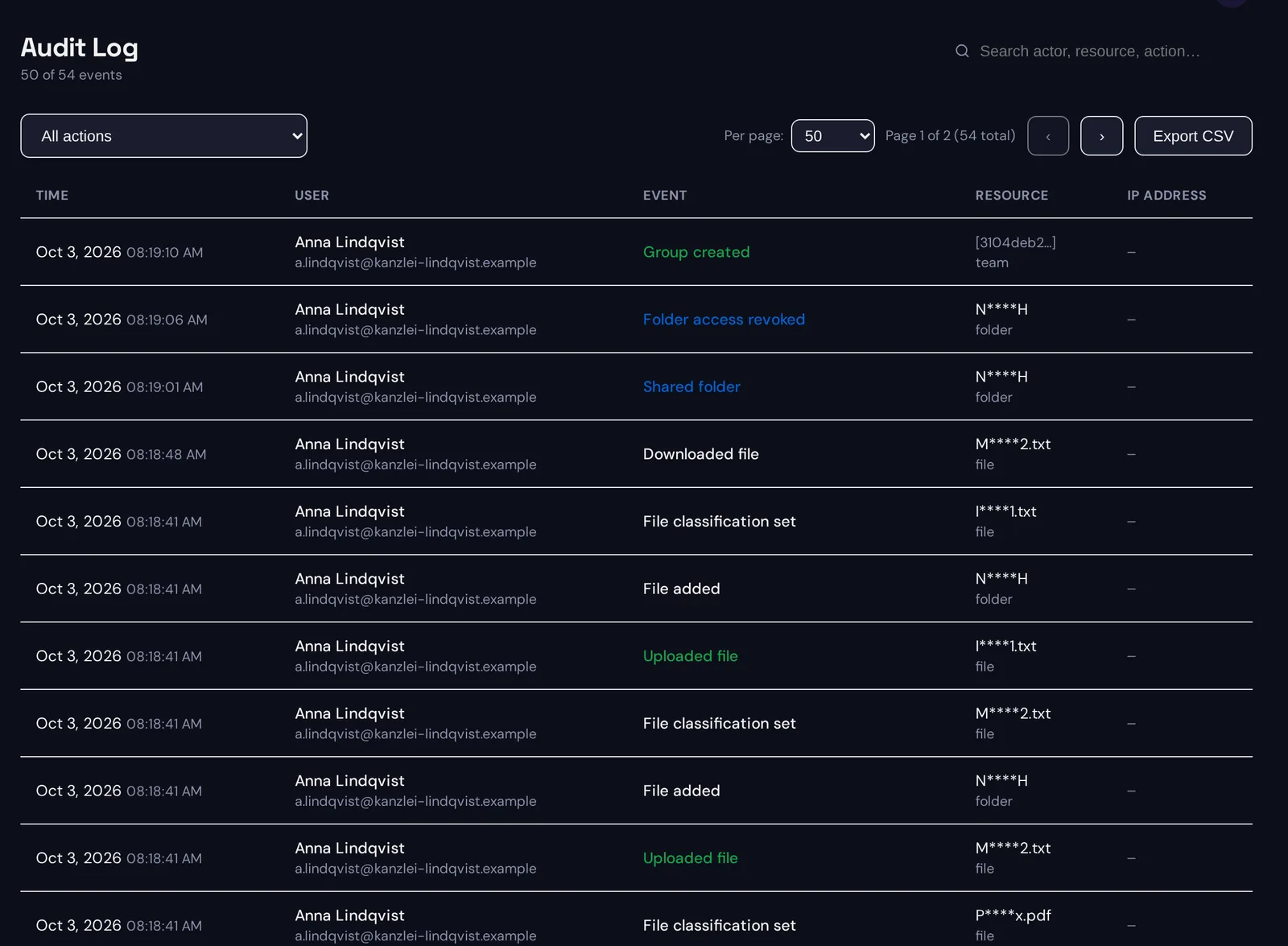
- Audit entries record a masked form of the name: the first and last character plus the extension, such as NH for a folder or M2.txt for a file. Enough for an administrator to recognise an entry they are looking for, not enough to read the name.
- Reports show the same masked names unless the tenant switches on plaintext reporting, discussed below.
- Renaming a folder re-encrypts only its name, under the same name key, so a rename is one small write, not a re-key.
What the server still sees
Encrypting names does not make the tree invisible, and we would rather list what remains than imply otherwise.
The server sees the structure: how many folders, how deep, how many items each holds, which folder is shared with whom. It sees sizes and timestamps. It sees the masked names in the audit log, which for a short name is most of the name. It sees the blinded search tokens, which reveal that two files share a word without revealing the word. None of this is content and none of it is a name, but a determined analyst with the whole set could infer more than nothing. Our article on what the server can and cannot see lists every item.
One thing is worth stating plainly because it is a decision rather than a limit: a tenant administrator can choose to store plaintext names for reporting.
The switch, and why it exists
Some organisations need an inventory with real names: an access review that a data protection officer can read, an audit export that names the folder, not N****H. For them there is a tenant setting, off by default, that stores the full name of a folder or file on the server at creation, rename and upload, so that administrator reports show real names.
The setting says in plain words what it trades away: names stored this way are readable by the server and by administrators, while contents stay encrypted. Switching it off deletes every stored name. We made it a visible, documented switch rather than a quiet default, because the default is the whole point of this article, and an organisation that needs the other trade-off should make it knowingly.
Why it matters more than it seems
Three reasons, in increasing order of weight.
The first is leakage. A breach of a provider that stored names in plaintext is a breach of names, and names are often enough: the counterparty, the project, the person, the date. “The contents were encrypted” is a thin reassurance when the file was called what it was called.
The second is the legal position. Under the GDPR, a file name that identifies a person is personal data, full stop. Termination_Letter_Weber.pdf is personal data about Weber whether or not the letter is readable. A provider that holds names in plaintext processes that personal data and can read it. One that holds only ciphertext it cannot open still processes it in the formal sense of Article 4(2), but cannot take note of it, and that difference shows up in the processing agreement, in the risk assessment and in what has to be reported after an incident.
The third is what “end-to-end” is supposed to mean. If the promise is that the provider cannot read your documents, it should cover the parts of the document that are easiest to read. A product that encrypts the body and publishes the title has drawn the line where it was convenient to draw it, not where the data is.
Questions?
If you want to see how encrypted names behave in the sync client, in search or in reports, or your security team wants the name-key design in detail, get in touch at hello@sapherbox.com.