
Compute: sums, averages and medians over encrypted spreadsheets and forms, in your browser
A folder of spreadsheets or forms. Compute reads the files in your browser, aggregates or lists one value per file, and writes only the result back. The server never sees the data.
A folder of spreadsheets or forms usually ends in the same place: someone opens each file, copies a number into a master sheet, and sends the master sheet around. With an end-to-end encrypted platform that step gets harder, because the one place that could add things up for you, the server, cannot read a single cell. Compute is our answer: the adding up happens in your browser, over files that are decrypted there and nowhere else, and only the result leaves your device.
This article explains what a compute job is, what it can and cannot calculate, how it runs without a server ever handling plaintext, and what kinds of work it is for.
What a job is
A compute job is a saved definition with three parts.
- A source. A folder in your vault, subfolders included, and a file format: Excel and CSV, which covers .xlsx, .xls, .csv and .ods, or PDF forms with fillable fields.
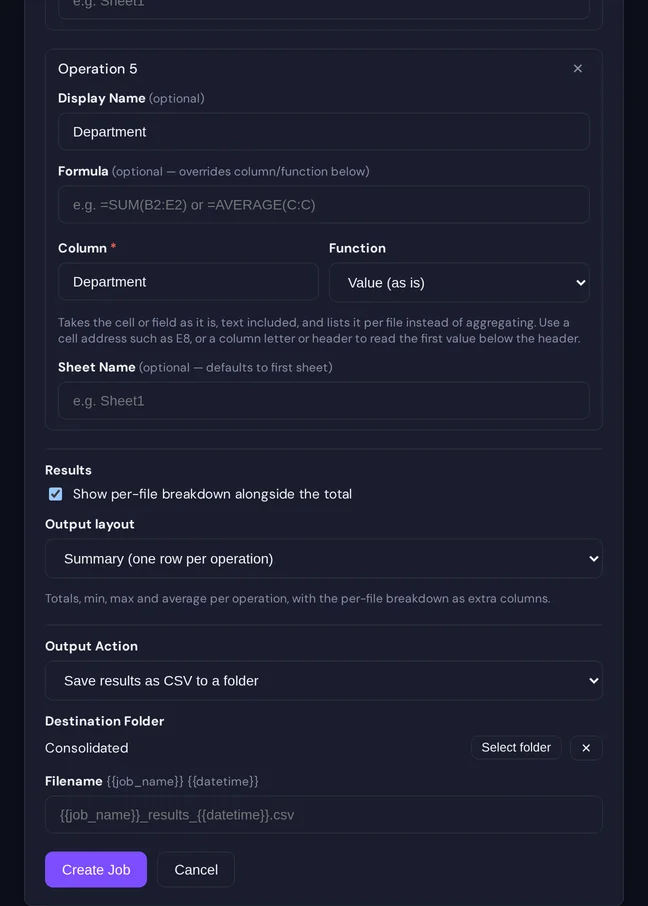
- Operations. Each operation has a name, a function and a target. The function is one of sum, average, median, count, minimum, maximum, “missing”, which counts the files where the value is absent, or “value”, which takes the cell or field as it is, text included, and lists it per file instead of aggregating. The target is a column of a sheet, a form field, or a small formula in spreadsheet notation such as
=SUM(B2:E2)or=C10/C9*100, with cell references, ranges and the four arithmetic operators. A column can be named by its letter or by its header; a single cell such asE8works too. - An output. The results on screen, a CSV saved encrypted into a folder you choose, or a JSON message to a webhook.
A second kind of run can follow the first: derived operations that compute over the first run’s results by name, for example {{output}} / {{capacity}} * 100 for a utilisation rate across all files. That is how a job produces a key figure rather than a column of raw sums.
Job definitions are documents too, and we treat them that way: the name, the operations and the output file name are encrypted with a key of their own, sealed to you and to the colleagues you share the job with. The server stores a sealed blob and the folder it points at. The audit log records that a job ran, under a masked name.
How a run works
Press Run, and your browser does the whole job.
- It lists the files in the source folder and downloads them one by one, decrypting each with keys you already hold, exactly as the file viewer does.
- For a spreadsheet it opens the workbook in memory and reads the column or evaluates the formula on the sheet you named. For a PDF form it reads the form fields: a text field becomes a number, a checkbox becomes one or zero, a dropdown its selected value.
- It keeps one value per file per operation, zeroes the decrypted bytes, and moves to the next file.
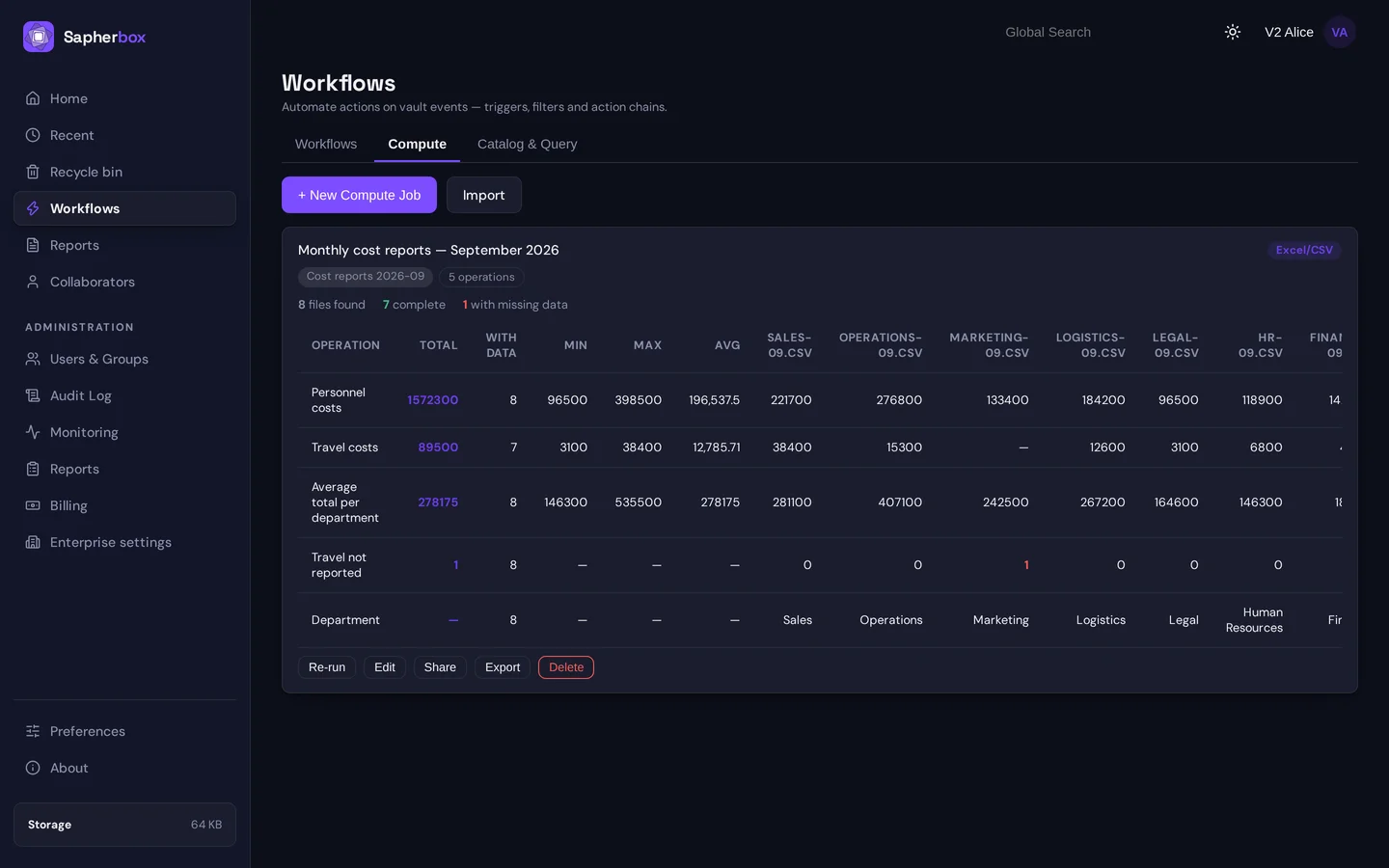
- At the end it aggregates across files with the function you chose, and shows a table: the total, how many files had a value, the minimum, maximum and average, and, if you leave the breakdown switched on, one column per file so you can see which one contributed what and which one had nothing. A “value” operation has no total; its row simply shows what each file said, a department name or a reporting period as much as a number.
Nothing in that sequence touches the server beyond the downloads it would serve for any viewer. The server learns that you fetched thirty files and, if you save the output, that one new encrypted file appeared. It does not learn a figure.
Where the result goes
The result is where the design has to be most explicit, because an aggregate is content you made from content.
- On screen it stays in the tab, like a preview.
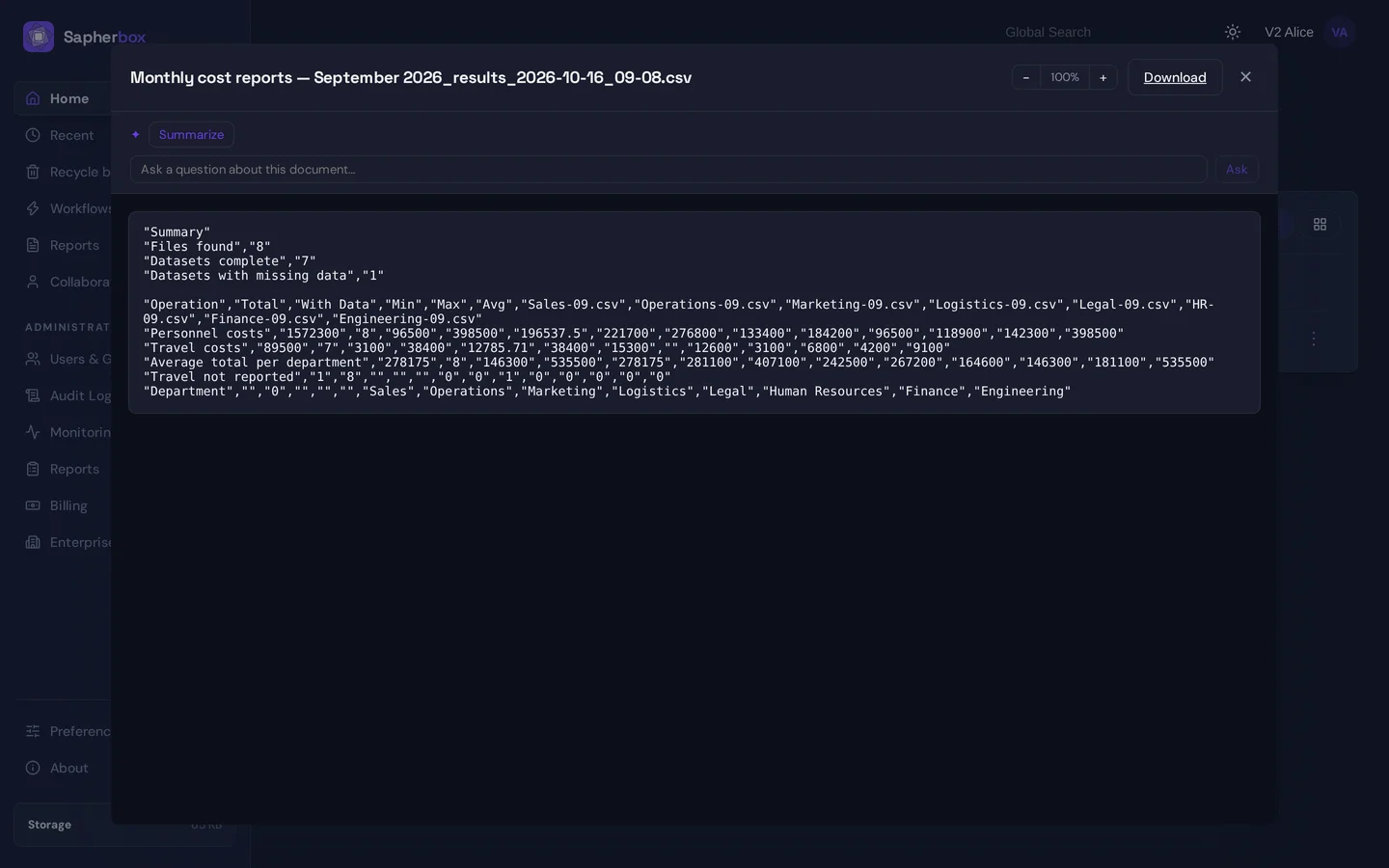
- Saved to a folder it becomes a CSV, encrypted in the browser under a new file key before upload. The job chooses the layout: a summary with a header that says how many files were found, how many were complete and how many had missing values, followed by one row per operation; or a table with one row per source file and one column per operation, which is the shape you want when the job extracts values rather than adds them up. Either way it is a file like any other: shareable, versioned, searchable by name, deletable.
- Sent to a webhook it leaves your device in plain text, as a JSON body with the operation names, the aggregates and the per-file values, or, in the table layout, one entry per file with its values, to the URL you configured. That is the one path on which figures travel unencrypted, and it exists for the integrations described in Make.com and Zapier: automations that never see your files. Use it when the receiving system is one you trust with the numbers, and only then.
Scheduling, without a server that can compute
A workflow can have “run compute job” as an action, for instance every time a file lands in the intake folder, or on the first of the month. The server cannot execute it, so it queues the run and tells the job’s owner. The next time the owner opens Sapherbox, the pending run is waiting at the top of the Compute page, and one click executes it in that browser with that person’s keys. A queued run is a request, never a computation; the computation always needs a person’s open session.
What it is for
Compute fits any process where many files of the same shape each carry a few figures, and someone needs the figures across all of them without being allowed, or willing, to hand the files around.
- Surveys and data calls. An association, a regulator or a group parent sends a form or a template to its members, each member returns one file into an intake folder, and the coordinator needs totals, averages and the spread: installed capacity across an industry, headcount across subsidiaries, energy use across sites. The returns stay in a folder only the coordinator can open; the summary is a CSV the board can read.
- Periodic reporting from the same template. Monthly cost reports per department, quarterly KPI sheets per business unit, weekly production logs per plant. One job, run each period over the new files, gives the consolidated figures without a master sheet that has to be maintained by hand.
- Checks on completeness. The “missing” function counts the files in which a value is absent, so the first run of a data call tells you who has not filled in which field before you chase anyone.
- A register from a folder of returns. The “value” function with the table layout turns a folder of forms into a list: one row per file with the respondent’s name, the reporting period, a reference number and the figures beside them, without opening a single file. The list is itself an encrypted CSV, and the returns stay where they are.
- Audits and reviews over a document set. An auditor with access to a folder of invoices exported as spreadsheets can total amounts, count line items or find the largest and smallest without downloading a single file to their own machine, and the audit log shows that the job ran, not what it found.
- Derived key figures. A second run can compute over the first run’s results by name, for instance a utilisation rate from a total output and a total capacity, or a cost per unit from a total cost and a total quantity. The job delivers the figure a reader asks for, not the columns it was made from.
- Feeding another system. With the webhook output, the aggregates of a run go straight to a reporting tool, a sheet or a ticket, as described in Make.com and Zapier: automations that never see your files, while the source files never leave the vault.
The common thread is that the figures matter and the files do not, at least not to the people who need the figures. Compute lets the files stay where end-to-end encryption put them and moves only the numbers. A job definition can also be exported as a file and imported into another tenant, so an organisation can hand a template and the matching job to its members together.
What it does not do
- Aggregation is numbers only. Sum, average, median, minimum and maximum need a number per file; text and dates are skipped. The “value” function carries text through, but it only lists, it never adds up, and the “missing” function is the only one that looks at a non-numeric state.
- One column, one sheet, per operation. A compute job does not join files or look up values across sheets. If a figure has to be computed from several cells, the formula does it within one sheet. Joins are the job of the Catalog & Query tab next to it: it loads folders of CSV files into tables in an in-browser SQL engine, where you can join, group and filter them freely, and it saves the result encrypted in the same way. Catalogs read CSV only; spreadsheets and PDF forms stay with compute jobs.
- A small formula language. Sum, average, count, min and max over ranges, cell references and arithmetic. Nothing that reaches outside the sheet, no conditionals, no text functions.
- It needs a browser. A run downloads and decrypts every file in the source folder on the device that runs it. A folder of three hundred workbooks is a few minutes and some bandwidth; a folder of fifty thousand is not a compute job, and a scheduled run still waits for a person.
- Scanned forms do not count. A PDF form is read through its fields. A scan of a filled-in form is a picture and yields nothing, the same limit the classifier and the on-device AI have.
- A webhook receives plain text. Said above and worth saying twice.
Why this fits an encrypted platform
Server-side analytics would have been easier to build, and it would have required the one thing the rest of the product refuses: a server that holds keys. Running the computation where the documents are already readable, in the user’s browser, keeps the promise in what our servers can and cannot see intact, and it puts the decision about where a result may go in the hands of the person who made it. That is the same responsibility model as sharing: whoever runs the job owns what happens to the output.
Questions?
If you have a folder of returns, invoices, forms or reports that someone types into a master sheet today, we are happy to look at whether a compute job replaces that step, and to share the survey sample data and job definitions. Write to hello@sapherbox.com.