
What our servers can and cannot see
End-to-end encryption hides content, not everything. Here is the complete list of what a Sapherbox server holds in plaintext, why each item is there, and what it cannot read.
Every encrypted service tells you what it cannot read. Few tell you what it can. The second list is the one a security reviewer needs, and it is the one that gets left off the page, because it is longer than people expect and less flattering than “zero knowledge”.
This is our second list, complete, with the reason each item exists. If you only read one section of this article, read “Can see”. The rest explains why.
Why a server sees anything at all
A document platform has to do work on the server: store objects, enforce who may fetch which, show a folder tree quickly, run reports an administrator can act on, send notifications, keep an audit trail. Every one of those jobs needs some information in a form the server can use. The design question is not whether the server sees metadata, but which metadata, whether each item is necessary, and whether it is written down.
In Sapherbox the rule is simple. Content and names are encrypted on your device; the server holds ciphertext and sealed keys. Everything the server needs to run the platform is kept in plaintext, and nothing else is. What follows is that everything.
Can see
About files and folders
- File sizes, in bytes, and the number of chunks a file was uploaded in.
- Timestamps: created, modified, uploaded, deleted, last accessed.
- Version counts and version history dates.
- Folder structure: which folder is inside which, how many items each holds, the shape of your tree. Folder names are encrypted; the hierarchy is not.
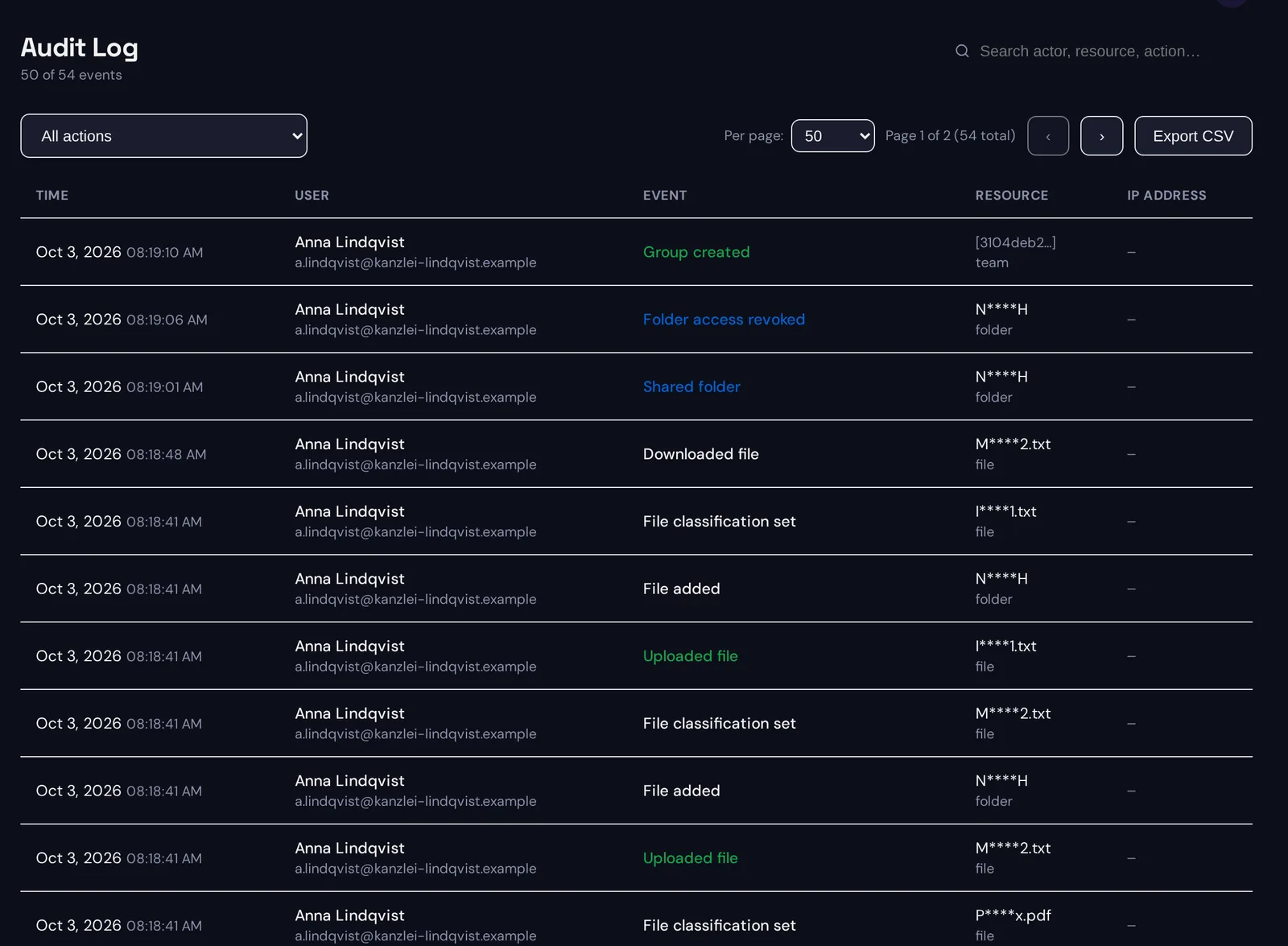
- Masked resource names in the audit log. When a file or folder is created or renamed, the audit entry records a masked form of its name: the first and last character of the name plus the extension, such as “c****t.pdf”. Enough for an administrator to recognise an entry in a log, not enough to read the name.
- Classification labels, if classification is enabled: the category names a file was tagged with, such as personal data or financial data, never the content they were found in.
- Trust state from content disarm: whether a file was sanitised, is pending, or is exempt.
About people and access
- Account identity: email addresses, the directory name and organisation an administrator maintains for each user, role, account type, sign-in method, when the account was created and last used. The email address is the login identifier and the delivery address for invitations and alerts; role and account type are what the server enforces. The directory name and organisation are readable because the server composes them into folder listings, collaborator lists, audit entries and the mails it sends. The profile fields a user maintains about themselves, company, phone number and postal address, are encrypted under a per-user key and are not in this list.
- Public keys and signatures for every user, group and folder. These are public by nature.
- The access graph: which user or group holds a grant on which file or folder, at which permission level, granted by whom and when. The sealed keys inside each grant are opaque; the fact of the grant is not.
- Group membership and group admin roles.
- Sessions and devices: active sessions, their creation time, the client type, passkey registrations.
About activity
- Every audit event: who signed in, uploaded, downloaded, previewed, shared, renamed, moved, deleted, changed a setting, ran a report, and when. The audit trail is the platform’s evidence, and evidence has to be readable. It reveals access patterns: who works on what, with whom, and how often.
- Client IP addresses, only if the administrator has enabled IP logging and the user has consented. Anonymous events never record an IP.
- Search activity in blinded form: which tokens were queried and which files matched. The server does not know the words behind the tokens, but it knows a search happened and what it returned.
About search
- The blinded search index: for every indexed file, the set of tokens derived from its name and content under the user’s search key. The server cannot reverse a token into a word. It can see how many distinct tokens a file has, which files share a token, and how often a token recurs. The article on blind indexing covers what can be inferred from that.
About automation
- Workflow definitions: triggers, conditions and actions, including email addresses and webhook URLs you configured, and a classification filter if you set one.
- Compute job settings: which folder a job reads, where it writes results, the file-format filter, and when it last ran. The job’s name, its list of operations and its output filename template are encrypted, since an operation can name a spreadsheet column, and results are encrypted when you save them.
- Public link settings: expiry, download limits, whether a password is set. The link key itself travels only in the URL fragment and never reaches the server.
Optional, and off by default
- Plaintext file and folder names for administrator reports. A tenant administrator can switch on a setting that stores the full name of every file and folder on the server at creation, rename and upload, so that access inventories and audit exports show real names instead of masked ones. The setting says in plain words that names stored this way are readable by the server and by administrators. Switching it off deletes every stored name. Content stays encrypted either way.
Cannot see
- The content of any file, including notes written inside Sapherbox.
- The names of files and folders, except in the optional reporting mode above.
- File types. The MIME type travels sealed under the file key next to the name, so the server cannot tell a PDF from a spreadsheet except by guessing from size. Files uploaded by older clients may still carry the type in the clear until they are re-uploaded.
- Previews, thumbnails and extracted text. These are produced on your device and never stored.
- Search terms, and the words behind any token.
- Tag names. Tags are stored as a keyed hash plus an encrypted label.
- Passwords, recovery codes, escrow passphrases.
- The profile a user fills in for themselves: company, phone number, address. Only the administrator-maintained directory name and organisation are readable, as described above.
- The account master key, any identity private key, any folder or group private key, any file key. Every one of these reaches the server only sealed under a key the server does not have.
- Compute job names and operation lists, and SQL queries saved in the catalog. Both are sealed under a key shared only with the people the job or catalog is shared with.
- The contents of a public upload or download: encrypted on the sender’s device, decrypted on the recipient’s.
What the server could infer
Honesty requires the next step too. Metadata is not nothing, and a server that holds the items above, or an attacker who takes them, can infer things.
- From sizes and timestamps: roughly how active a folder is and when.
- From the access graph and audit trail: who collaborates with whom, which folders matter to which teams, when someone’s activity stops.
- From masked names: the extension and two characters of every file name, which for short names is most of the name.
- From the search index: that a term recurs across many files, and which files a search that interested someone returned.
- From classification labels: that a folder contains health or financial data, if those categories are on.
None of this exposes content. All of it is more than “zero knowledge” implies, which is why we do not use that phrase and why “Zero knowledge” is a design, not a policy was about exactly that difference. The security overview carries the short form of this list; this article is the long form, and the whitepaper for security teams lists the same items as a numbered known limitation.
What you can do about the parts that matter to you
- Leave classification categories off that would themselves reveal something, or use custom patterns with neutral names such as public, internal only, confidential and secret, so the server sees a sensitivity tier rather than what kind of data it is.
- Leave IP logging off unless you need it for a specific control.
- Leave plaintext report names off unless your administrators need real names in inventories, and understand what that trades away.
- Name files and folders with the masking in mind if the first and last characters would give too much away in an audit export.
- Treat the audit trail as the sensitive record it is: it is the most informative thing the server holds, and its retention is yours to set.
- If even the directory of who works in your organisation must be hidden from the operator, the honest answer is self-hosting, where the operator is you. No metadata design removes the fact that a server needs to know who its users are.
Questions?
If your security team wants this list mapped field by field to the database schema, or wants to discuss which items matter for your threat model, get in touch at hello@sapherbox.com.