
The right to erasure, without a ticket
GDPR gives everyone the right to have their data deleted. For guests on a Sapherbox tenant that right is a button on their own profile, not a ticket at someone else's helpdesk.
Article 17 of the GDPR is short. A person may ask the controller to erase their personal data, and the controller has to do it without undue delay, unless a listed exception applies. Article 20 sits next to it: the person may ask for a copy of their data in a machine-readable format. Together they are the two rights most likely to be exercised by someone who is not an employee of the organisation running the system: a client, a counterparty, an external adviser who was given access for a project that has ended.
Those are exactly the people most document platforms handle worst. They are guests. They do not have a helpdesk to call. The organisation that invited them may have no process for a deletion request from outside, and the person who invited them may have left. In practice the request becomes an email to a general address, a ticket somewhere, and a wait.
We think the right to erasure should not depend on the diligence of someone else’s IT department. On a Sapherbox tenant a guest can exercise it themselves, on their own profile, in about a minute. This article is about what that control does, what it deliberately does not do, and why the design holds up under the cryptography.
Who this is for
A Sapherbox tenant has two kinds of accounts. Managed accounts belong to the organisation that runs the tenant: its employees, created by its administrators, part of its directory. Guest accounts belong to people outside it, who were invited to a folder or a file and registered through the invitation link. The tenant’s administrators can see that a guest exists, what the guest was given access to, and the directory name and organisation the inviter recorded. They do not own the account.
For a managed account the organisation is the controller of the account data in the ordinary way, and deletion is part of its joiner-and-leaver process: an administrator deactivates or deletes the account, and the audit log records who did it. For a guest the relationship is different. The guest’s own profile, their password, their keys and the files they own are theirs, and it would be odd to make them ask the organisation’s administrator for permission to leave.
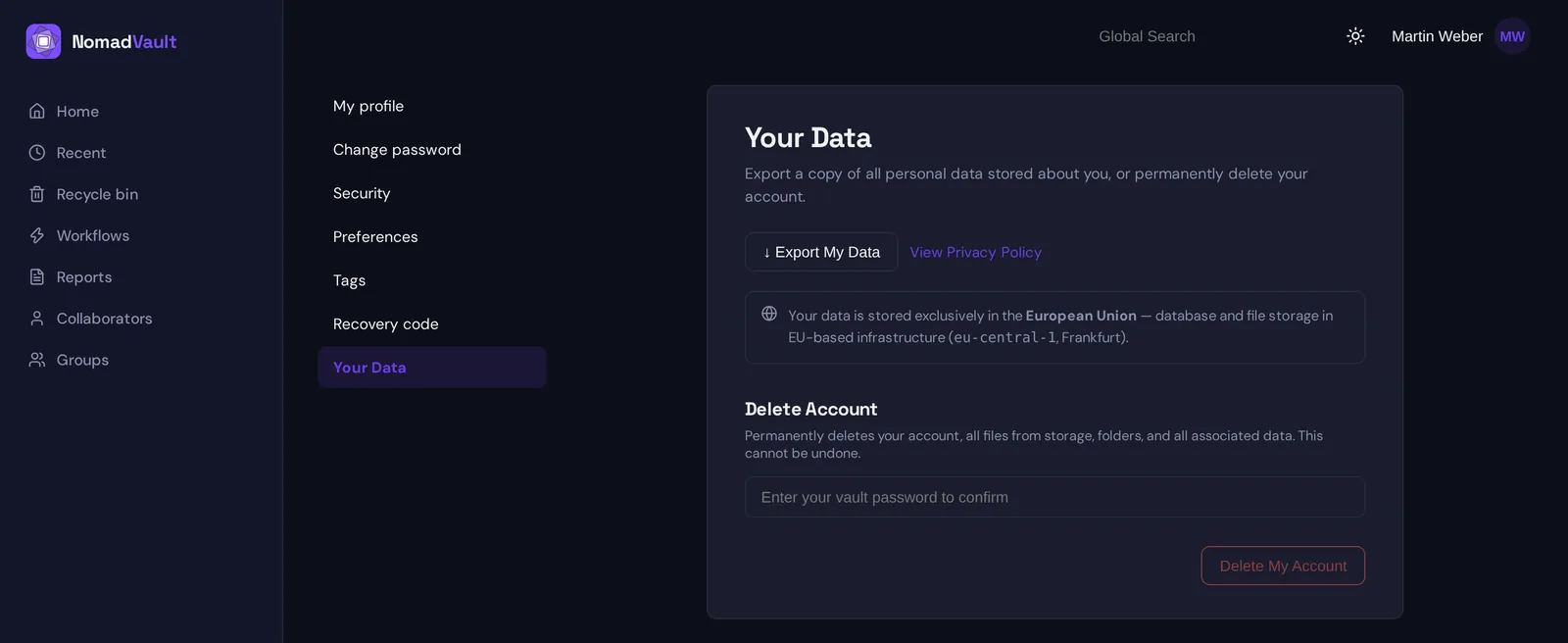
So the controls described below live on the guest’s own Preferences page, under “Your data”. No administrator is involved, nobody has to approve, and the result is immediate. A managed account sees the export but not the delete; in its place is a note that the organisation’s administrator removes the account, because an employee’s account is the organisation’s record, and erasing it is the organisation’s act to perform and to log.
Export first
The first control is the Article 20 one: Export my data. It produces a JSON file with everything the tenant holds about the account: the profile fields, the list of files and folders the account owns with their identifiers, sizes and dates, and the account’s own audit trail, meaning the events the person performed, up to the retention limit.
Two things about that export are worth knowing. The file and folder names in it are the encrypted forms, because that is what the server has. The export is a record of what the tenant knows, and the tenant does not know your file names. If you want your documents themselves, download them from the vault before you delete; the export is the inventory, not the content.
And the export is instant, because it is read from the same database the application uses. There is no “we will send it within 30 days”, because there is nothing to compile.
Then delete
The second control is Delete my account. It asks for the account password to confirm, since an open browser tab should not be enough to erase someone’s account, and then does the following, in this order.
Every file the account owns is deleted from object storage. Not marked deleted, not moved to a trash folder, but removed from the bucket, each object by name. This includes files the account owns inside folders that were shared with other people, which is the one consequence worth pausing on: if you delete your account, the files you own disappear for your collaborators too. They were yours.
A single audit entry is written recording that the account was deleted, by the account holder, with the address and the time. This is the one piece of personal data the tenant keeps, and it is kept on purpose: an organisation has to be able to show that a deletion was requested and carried out, and Article 17(3) exempts exactly this kind of record from erasure, because it is needed to meet a legal obligation and to defend against claims. It expires with the tenant’s audit retention setting like every other entry.
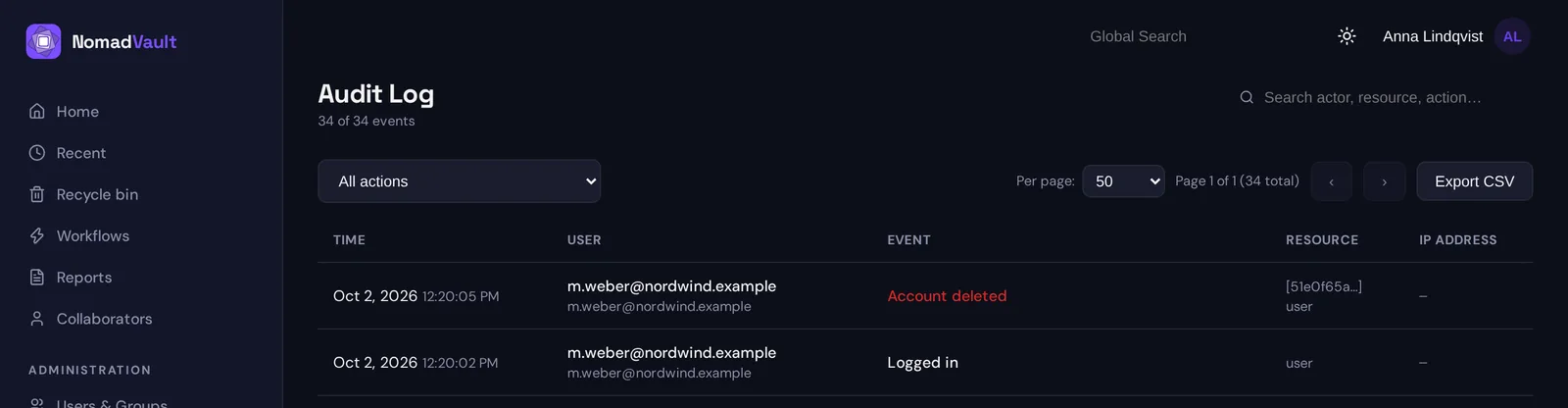
The account row is then deleted, and the database removes everything that hangs from it: folders, grants, sessions, passkeys, group memberships, invitations sent and received, the sealed private keys, the wrapped file keys, the search tokens, the profile. Earlier audit entries that mention the account as an actor lose their link to it; the events stay, because they are part of other people’s history too, but they no longer resolve to a person.
The whole thing is one request. When it returns, the account cannot log in, because there is no account.
Why the keys matter more than the delete
Deleting rows and objects is what every system does, and it is not the interesting part. The interesting part is what deletion means for the copies you cannot reach: backups, replicas, the object store’s own versioning if it is enabled, the cold copy an operator keeps for disaster recovery.
In a system that holds plaintext, erasure is only as good as the operator’s backup hygiene. The data is in the backup until the backup is rotated out, readable by anyone who can restore it.
In Sapherbox every file is encrypted under its own key, that key is sealed to the owner’s identity key, and the owner’s identity key is itself encrypted under a key derived from their password, which the server never had. Deleting the account deletes the sealed identity key and every sealed file key with it. A backup taken yesterday still contains the ciphertext of your files, and it contains the sealed keys, but the sealed keys are locked boxes. The keys to those boxes are your password, your recovery code and, if your tenant has switched on administrator escrow, the organisation’s escrow key. The password lives nowhere. The recovery code is yours, and you can destroy it. The escrow key, where it exists, is held by the organisation, and it is the one thing to ask about before you rely on crypto-shredding. Without one of those three, no one can restore that backup into something readable. The ciphertext ages out of the backup rotation as random bytes.
This is sometimes called crypto-shredding, and it is the reason we can say that, for an account without escrow, deletion is complete the moment the request returns, rather than complete once the last backup expires. The regulation asks for erasure without undue delay. A design where erasure is a matter of keys, not of finding every copy, is the only one that can honestly promise that.
What deletion does not do
An honest Article 17 implementation also lists its limits, because the regulation itself does.
Files shared with you by others are not touched. They belong to their owners. Your access to them ends because your grants are deleted, and the owners will see you gone from their member lists, but their documents stay with them.
Copies you downloaded, or copies others downloaded of files you shared, are outside the tenant and outside anyone’s deletion. No system can recall a PDF from someone’s laptop. We have written about that limit in the context of revocation and it applies here unchanged.
The audit entries that other people’s actions produced, such as “shared folder X with you” in the inviter’s trail, remain as events, with your identity unlinked. An organisation’s obligation to keep a record of who was given access is also a legal obligation, and the regulation lets those two rights coexist by keeping the event and dropping the person.
And the deletion is not reversible, which is why it asks for a password and says so in plain words. There is no 30-day grace period in which an administrator can restore the account. There is nothing to restore it from.
For the organisation running the tenant
If you operate a tenant, this is the part of your Article 17 process you no longer have to run for guests. A guest who wants out does not need to find your data protection contact; they can act, and your audit log will show that they did. Your process still covers managed accounts, where you are the controller, and it still covers the data about guests that lives in your own records rather than theirs: the directory name and organisation your people recorded for them, which the deletion removes with the account, and anything you exported from the platform into your own systems, which it cannot.
What you gain is a right that is exercised rather than requested, and a log line that proves it.
Questions?
If your data protection officer wants to map these controls to your records of processing, or you want to know how deletion interacts with your retention settings, get in touch at hello@sapherbox.com.