
Safe uploads without a server that reads them: content disarm and reconstruction
An end-to-end encrypted platform cannot scan files on the server. Sapherbox removes active content before encryption instead. What that covers, and where antivirus still belongs.
Every file-sharing service has to answer the question of what happens when someone uploads a document with a macro in it. The usual answer is a scanner on the server: the file lands, an antivirus engine inspects it, and the service quarantines what it does not like.
Sapherbox cannot do that, by design. The server only ever holds ciphertext, so there is nothing for a server-side scanner to look at. For a while that looked like a trade-off we would have to explain away. It turned out to be an opportunity to do something better than scanning.
Disarm rather than detect
Antivirus works by recognising known bad things. It needs a signature, a heuristic or a sandbox verdict, and it is always one step behind the attacker who wrote the macro this morning. Content disarm and reconstruction, usually shortened to CDR, works the other way round. It does not try to decide whether a file is malicious. It removes every part of the file that could carry an attack, keeps the parts a human needs, and rebuilds the file from those.
A Word document needs its text, formatting, images and tables. It does not need its VBA project. A PDF needs its pages. It does not need its JavaScript, its embedded files or its launch actions. An image needs its pixels, not the metadata block a camera or an exploit kit wrote into it. CDR keeps the first list and drops the second, whether or not anything in the second list was dangerous. There is no signature to be out of date.
Where it runs
In Sapherbox, CDR runs in your browser at upload, before the file is encrypted. The sequence is: the file is selected, it is disarmed and rebuilt locally, the rebuilt file is classified if that is enabled, then it is encrypted and sent. The server receives ciphertext of a file that has already been cleaned. It never sees the original and never needs to.
What the cleaner does depends on the format:
- Word, Excel and PowerPoint in the modern formats. Macro projects, ActiveX controls, embedded OLE objects and external data connections are removed and the package’s internal manifests are rewritten so the document still opens correctly. Ordinary hyperlinks are kept, since a link in a contract is content, not an attack vector. Legacy binary Office files from before 2007 cannot be taken apart safely and are refused with a message asking for the modern format.
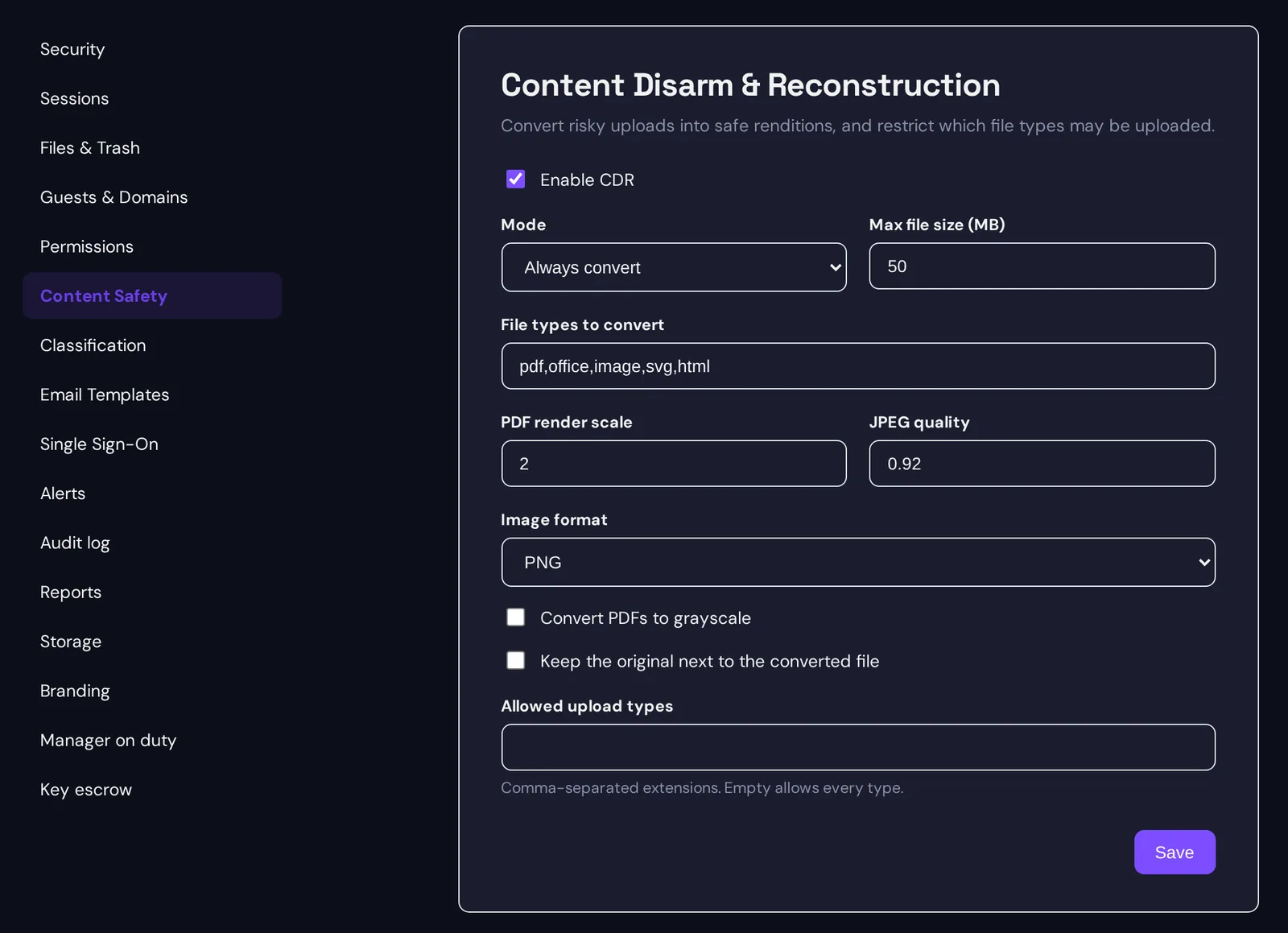
- PDF. Each page is rendered to an image and a fresh PDF is assembled from those images, with an invisible text layer placed over each page so the result is still searchable and text can still be selected. JavaScript, forms logic, embedded files, launch actions and anything else that lives outside the visible page are gone, because the new file was never built from them. Administrators choose the render resolution, image format and an optional grayscale conversion that shrinks scanned documents considerably.
- Images. JPEG, PNG, GIF, WebP and BMP are decoded and redrawn, which strips EXIF data, embedded thumbnails and anything hidden in metadata. A file that claims to be an image but cannot be decoded is refused rather than passed through.
- SVG and HTML. Scripts, event handlers, iframes and references to external resources are removed from the markup.
Every outcome is recorded. The upload confirmation lists what was removed, the file’s properties show its state, and the audit log records a sanitised upload or a refused one.
Files that arrive by other routes
Not everything enters through the web uploader. The desktop sync client, the native apps and anonymous upload links also bring files in, and a file uploaded before CDR was switched on was never cleaned either.
Sapherbox handles that with a trust state on every file: clean, pending, or exempt for formats the cleaner does not cover. A file that is pending is disarmed on the way out instead: when someone opens or downloads it in the browser, the decrypted bytes go through the same cleaner before they are shown or saved, and the file is marked clean for everyone afterwards. A “scan now” action in the file’s properties does the same on demand. For recipients of an anonymous download link the rule is stricter: if a pending file cannot be cleaned, the download is refused rather than handed out unchecked.
What the administrator decides
CDR is a tenant setting with three enforcement modes: always on, so nobody can skip it; selective, for the file types the organisation chooses; or optional, on by default but switchable per upload. A separate allow-list restricts which file types may be uploaded at all, independent of cleaning. A size limit keeps very large files out of the browser-side renderer, and those are stored as pending.
There is also the question of the original. Some organisations must keep the file exactly as received, for legal or forensic reasons. For them, CDR can store the unfiltered original next to the cleaned copy. The original carries a red warning marker in every listing and remains accessible to authorised users; the cleaned copy is what everyone sees by default.
What it is not
This is the paragraph the security overview makes a point of including, and it belongs here too.
CDR removes active content. It is not a malware scanner and does not claim to detect threats. A document that is harmful because of what it says, a phishing letter, a fraudulent invoice, is untouched by it. File types the cleaner does not handle, plain text, archives, audio, video, are stored unchanged and marked exempt. For those, and as a second layer for everything else, endpoint protection on the devices that upload, sync and open files remains the control, and providing it is the customer’s responsibility. Sapherbox reduces what reaches those devices; it does not replace what runs on them.
Two more limits worth knowing. PDF cleaning is capped at 200 pages per document to keep the browser responsive, and a PDF rebuilt from page images is larger than the original unless grayscale is used. And the cleaner changes files: a spreadsheet loses its macros even if they were the point of the spreadsheet. The optional mode and the keep-original setting exist for exactly that case.
Your responsibility: endpoint protection, regardless
One point deserves its own heading so that nobody reads past it. Endpoint protection on every device that uploads, syncs or opens files, including a current, managed antivirus control, is the customer’s responsibility. That holds regardless of whether CDR is enabled, which enforcement mode is chosen, which file types are covered, or how clean a file is marked in Sapherbox.
CDR is a reduction of attack surface inside the platform. It is not, and is not offered as, a substitute for the controls your security policy already requires on laptops, desktops and phones. A tenant without endpoint protection is not made safe by CDR, and we would rather say so in plain words than let the feature imply otherwise.
Why this fits an encrypted platform better than scanning
A server-side scanner is a component that reads every file in plaintext. In an end-to-end encrypted design that component cannot exist, and we think that is a feature rather than a gap. Cleaning on the device means the plaintext stays where it already was, the cleaning cannot be bypassed by someone who compromises the server, and the result is deterministic: the same document cleaned twice gives the same clean document, with no verdict that might change next week when the signatures update.
It also means the protection travels with the file. A document that was disarmed at upload is still disarmed when it is shared with a guest, synced to a laptop or downloaded through a link months later.
Questions?
If you want to discuss how CDR fits your existing endpoint protection, or your security team wants the exact list of what each format cleaner removes, get in touch at hello@sapherbox.com.